Reliable connections for A/V equipment
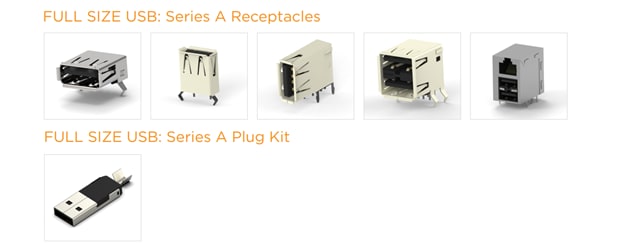
The USB Type-A connector, commonly referred to as a USB-A connector, is the original and most common type of Universal Serial Bus (USB) connector. It is rectangular with flat edges. It has only one correct orientation, meaning it is not reversible like the newer USB-C. USB-A connectors are commonly found on host devices such as computers, laptops, tablets, game consoles, media players, and power adapters. These are found on peripheral devices that connect to host devices such as keyboards, mice, flash drives, external hard drives, smartphones, printers, and scanners. Common uses include data transfer, charging, and supplying power. USB-A supports numerous USB versions, including USB 1.0, USB 2.0, USB 3.0/3.1 Gen 1, USB 3.1 Gen 2, and USB 3.2 Gen 1x2.
USB Type-A connectors epitomize versatility, serving as the standard interface for a myriad of devices across industries. Characterized by their rectangular shape and robust build, USB Type-A ports are ubiquitous in peripherals like keyboards, mice, and printers. Their widespread adoption enables compatibility with legacy systems and modern devices alike, making them indispensable components in professional and consumer electronics.
What Customers Ask
FAQs on USB Type-A Connectors
Q: What are the main differences between USB Type-C and USB Type-A connectors?
USB Type‑C connectors offer a reversible 24‑pin interface capable of high‑speed data transfer, power delivery, and optional A/V alternate modes. Type‑A connectors use a unidirectional interface with fewer conductors and are designed primarily for host‑side ports. USB Type‑C generally delivers higher functional density in a smaller connector, whereas Type‑A remains useful where legacy compatibility is required.
Q: Which USB connectors are best for external storage devices?
Designers typically use USB Type‑C or USB 3.x Type‑A connectors to support higher bandwidth and elevated current levels. These interfaces allow reliable data paths to external hard drives and SSDs while maintaining backward compatibility.
Q: Which USB connectors are best for minimizing signal interference?
TE’s high‑speed USB Type‑C and USB 3.2 Type A connectors incorporate EMI‑optimized shell geometries and controlled‑impedance designs that help manage crosstalk and emissions. Sealed and metal‑shell variants provide additional shielding benefits.